A phone can become quieter in two very different ways. You can change the interface on the smartphone you already own, replacing the bright grid of icons with a short text list. Or you can replace the device itself with a minimalist phone that simply cannot run most of the apps that compete for your attention.
Both approaches can help. Neither is a magic cure for distraction, and neither answers the most important question on its own: What will you do with the time and attention you reclaim?
This guide compares two minimalist launchers and three purpose-built phones using current information from their official websites. It explains the practical tradeoffs, what research can and cannot tell us, and why an offline printable may be the missing layer between a quieter screen and a genuinely different daily routine.
The short answer: Start with a launcher if you still need banking, rideshare, authentication, work, or accessibility apps. Consider a minimalist phone when easy access to those apps repeatedly defeats your boundaries. In either case, use an offline plan to decide what the newly available time is for.
What “minimalist phone” actually means
The language around this category is messy. “Dumb phone,” “feature phone,” “minimalist phone,” and “digital detox phone” are often used for devices with very different capabilities. It is more useful to think in three levels.
| Level | What changes | What remains | Best for |
|---|---|---|---|
| Quieter smartphone | Home screen, colors, badges, notifications | All smartphone apps remain available | Reducing cues without losing essential services |
| Restricted smartphone | Launcher plus blockers, limits, or locked modes | Selected apps remain available by design | People who need smartphone capability with firmer boundaries |
| Purpose-built minimalist phone | The operating system and app ecosystem | Calls, messages, and a limited tool set | People ready to accept inconvenience for stronger separation |
This spectrum matters because the strongest restriction is not always the best choice. A phone that leaves you unable to authenticate a bank login, access a transit ticket, coordinate childcare, or use a necessary accessibility tool may create enough friction that you abandon the experiment. The goal is not to own the most austere device. It is to remove the specific access that causes problems while keeping the functions your life genuinely requires.
Why a simpler interface may change behavior
A conventional smartphone home screen is a collection of cues: color, placement, badges, previews, and familiar motor patterns. You may open an app before consciously deciding to do so because the icon is visible and the action has been repeated hundreds of times. A text-first launcher interrupts that sequence. It does not make the app disappear, but it can make opening it more deliberate.
Research on simplified interfaces is still narrower than the marketing around them. A 2026 crossover feasibility trial of grayscale mode in medical students found that grayscale was associated with reduced smartphone screen time in that sample. An earlier randomized controlled trial of a nudge-based intervention tested interface-level strategies including grayscale, rearranging apps, and disabling notifications. These studies support the idea that design changes can influence use, but they do not establish that every minimalist launcher will produce the same outcome for every person.
The mechanism is more modest and believable: fewer visible cues, slightly more friction, and a pause long enough for intention to catch up with habit.
Two launchers that make an existing smartphone quieter
1. Blank Spaces: a minimalist iPhone home screen
Blank Spaces uses widgets and shortcuts to replace the familiar iPhone icon grid with a restrained, text-based interface. You choose a small list of apps, hide the other home-screen pages, and make the device less visually inviting without giving up iPhone services.

Official interface image from Blank Spaces.
Why it can help: it changes the first thing you see when you unlock the phone. The apps you intentionally choose stay accessible, while the rest require a more deliberate route through search or the App Library. That makes it a relatively low-risk experiment for someone who cannot realistically replace an iPhone.
What to know: iOS does not allow a third-party launcher to replace the operating system in the same way Android does. Blank Spaces works within Apple’s widget, shortcut, focus, and Screen Time systems. The distracting apps are still installed, and swiping or searching can still reach them. Its official pricing page currently lists subscription and lifetime options; confirm current pricing before buying.
Best fit: an iPhone user who wants fewer cues and a cleaner starting point, but still depends on the full smartphone ecosystem.
2. Before Launcher: a deeper Android replacement
Before Launcher can replace the default Android home screen with a minimal list of priority apps. Its official feature list includes app sorting, search, notification filtering, themes, folders, and—on its paid tier—options such as hiding apps and pinning selected ones.

Official interface image from Before Labs.
Why it can help: Android launchers can replace more of the home-screen experience than an iPhone widget can. Notification filtering also addresses an important second route into habitual use: the phone calling for your attention before you decided to pick it up.
What to know: a launcher reorganizes access; it does not necessarily prevent access. You can still open the app drawer, search for a hidden app, change the launcher, or use a browser. Customization can also become its own project. If you spend an afternoon perfecting fonts and folders but never define a phone-free dinner or bedtime boundary, the interface has changed more than the habit.
Best fit: an Android user who wants a meaningful visual reset while retaining every essential app.
Three phones built around intentional limitation
3. Light Phone III: useful tools without an open app store
The Light Phone III runs LightOS, an operating system designed around a limited toolbox rather than a conventional app store. Light’s current support documentation lists tools such as calls, messages, alarm, calculator, calendar, notes, directions, directory, music, podcasts, timer, and hotspot; tool availability changes through software updates, so buyers should verify the current list.

Official product image from Light.
Why it can help: the strongest feature is not the monochrome appearance. It is the absence of an endlessly expandable social, shopping, news, and gaming ecosystem. You cannot reflexively reinstall the same feed in the same way you can on a normal smartphone.
What to know: limitation is a real tradeoff, not just an aesthetic. Check carrier compatibility and confirm whether your required messaging, work, medical, transportation, banking, and authentication workflows can function without their usual apps. Light also manages contacts and optional tools through a web dashboard, so it is not completely independent of another connected device.
Best fit: someone who wants directions, hotspot, calendar, media, and a camera but does not want an open-ended app store in their pocket.
4. Punkt MP02: calls, texts, hotspot, and tactile simplicity
The Punkt MP02 is closer to a traditional feature phone. It uses a physical keypad, a small monochrome display, 4G calling, text messaging, and Wi-Fi tethering. Punkt’s official page also describes Pigeon, its Signal-protocol-based messaging feature, although availability and software support should be checked before purchase.

Why it can help: physical keys and a small non-touch interface make prolonged browsing unattractive. The hotspot offers a thoughtful compromise: the internet is available when you intentionally sit down with a laptop or tablet, rather than living as an infinite feed in your hand.
What to know: this is a premium object with intentionally narrow functionality. Punkt’s US page listed the MP02 at $299 when checked in October 2026, with limited stock routed through Amazon; price and availability can change. Messaging expectations also matter. Friends and family may rely on group chats, photos, or services the MP02 does not reproduce like a smartphone.
Best fit: a person who primarily needs calling, simple messaging, and occasional laptop connectivity—and genuinely prefers buttons to a touch screen.
5. Mudita Kompakt: E Ink with offline maps and selected modern tools
The Mudita Kompakt sits between a feature phone and a smartphone. Its official specifications list a 4.3-inch E Ink touchscreen, camera, dual-SIM support, NFC, expandable storage, GPS, Wi-Fi, Bluetooth, and a custom de-Googled operating system. Mudita promotes offline maps, essential tools, and an Offline+ switch designed to disconnect radios and sensors.
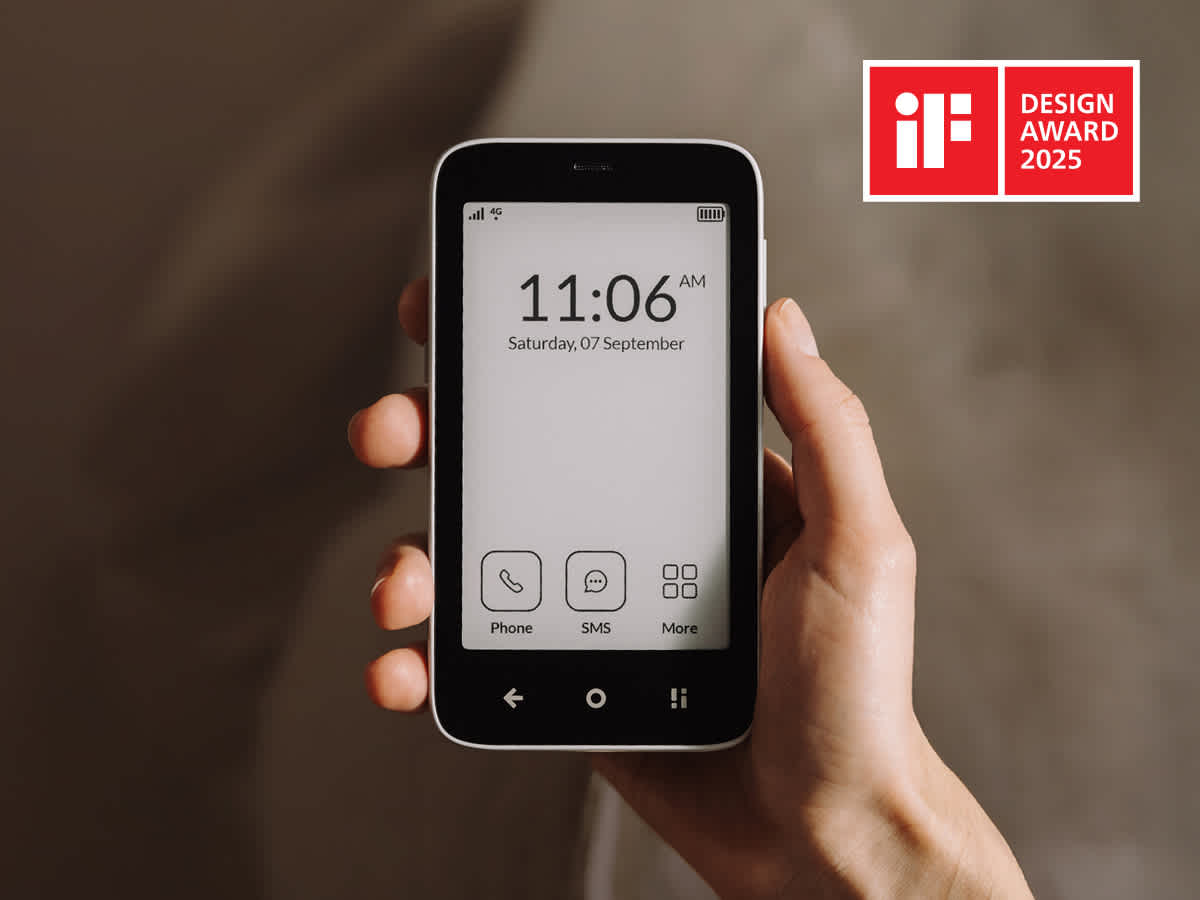
Official product image from Mudita.
Why it can help: the E Ink screen is slower and less visually stimulating than a conventional high-refresh color display, while maps, camera, audio, and modern connectivity reduce some of the practical pain of switching.
What to know: it is still a specialized device with a restricted software ecosystem. Mudita listed the North American and global versions as separate options and has changed features through system updates. Confirm regional network compatibility and the current third-party-app policy before buying.
Best fit: someone who wants a calmer, privacy-oriented device but needs more utility than a basic call-and-text phone provides.
Minimalist launchers versus dumb phones
| Question | Launcher on your current phone | Purpose-built minimalist phone |
|---|---|---|
| Can you keep every essential app? | Usually yes | Often no |
| Does it remove visual cues? | Yes, from the main interface | Yes, throughout most of the system |
| Can distracting apps be restored quickly? | Usually | Often impossible or much harder |
| Upfront cost | Free, subscription, or small software purchase | New hardware and possibly a new service plan |
| Best advantage | Low-risk and compatible with modern life | Strong environmental separation |
| Main limitation | The old ecosystem is still underneath | Useful services may be missing |
The research does not say that buying a dumb phone fixes wellbeing
There is stronger evidence that specific changes—reducing screen time, limiting selected services, changing visual cues, or creating planned periods of non-use—can alter behavior than there is evidence for any particular commercial phone.
A systematic review of 21 digital-detox studies involving 3,625 participants found mixed effects across wellbeing, relationships, self-control, and performance. A more recent randomized controlled trial of smartphone screen-time reduction reported improvements in several mental-health outcomes during the intervention, but one intervention cannot tell us that all users need the same device or that benefits persist indefinitely.
That distinction matters. A minimalist phone changes opportunity: the feed is unavailable or inconvenient. It does not automatically change the stress, boredom, loneliness, avoidance, or unstructured time that made the feed appealing. If those needs are ignored, people may switch to a laptop, television, tablet, or a different compulsive behavior.
What the devices miss and what a printable can add
Launchers and minimalist phones are good at subtraction. They can remove icons, feeds, alerts, and easy access. Subtraction creates space, but space is not yet a plan.
An offline printable handles a different part of the change:
- Name the trigger. Was the reach caused by boredom, social uncertainty, fatigue, a difficult task, or a real need?
- Define the boundary. “No social media before breakfast” is more actionable than “use my phone less.”
- Choose the replacement. A book, walk, call, sketchbook, prepared task list, or five-minute reset must be easier to begin than the old habit.
- Keep the intention outside the phone. The plan stays visible on a desk or nightstand without requiring another unlock.
- Review what changed. Screen-time totals matter less than whether the reclaimed minutes became sleep, conversation, focus, movement, or rest.
This does not prove that paper is universally superior to software or specialized hardware. Research has not made that head-to-head comparison. The advantage is practical: a printable places the purpose of the change in the physical environment, where it cannot turn into another notification, dashboard, or settings project.
Try a staged experiment before buying another phone
- Audit the requirement. List the phone functions you truly need for work, safety, transportation, finances, family, accessibility, and two-factor authentication.
- Run a launcher test for seven days. Use a text-based home screen, grayscale, fewer notifications, and one hidden or blocked problem app.
- Move the plan to paper. Write the protected times and replacement actions where you will see them.
- Simulate a minimalist phone weekend. Keep only calls, messages, maps, camera, calendar, and music available. Notice what becomes difficult—not merely what feels refreshing.
- Buy hardware only if the missing capability is acceptable. Check carrier bands, emergency features, navigation, group messaging, banking, work requirements, medical tools, and return policies first.
This sequence avoids turning a purchase into a promise. If a $0 interface change and a visible plan solve the problem, you have saved money and electronic waste. If they do not, the experiment tells you exactly which stronger boundary the new device must provide.
Frequently asked questions
Is a minimalist phone launcher the same as a dumb phone?
No. A launcher changes the home-screen interface on a smartphone. The apps and operating system remain underneath. A purpose-built minimalist phone restricts the entire software environment and may not support conventional apps at all.
Can I turn an iPhone into a dumb phone?
You can make it substantially quieter with a text launcher or widgets, grayscale, Focus modes, Screen Time limits, hidden pages, reduced notifications, and a simplified lock screen. It remains an iPhone, so its full capabilities are still available unless restrictions are protected by someone else’s passcode.
What is the biggest drawback of switching to a dumb phone?
Compatibility. Modern life often assumes access to authentication apps, parking and transit systems, QR codes, school or workplace messaging, banking, rideshare, and camera-based services. The right minimalist phone is the one whose omissions you can realistically live with.
Will a dumb phone reduce screen time?
It can make certain kinds of use impossible or inconvenient, so a reduction is plausible. Research has not established that every commercial minimalist phone produces the same result, and reduced phone time does not guarantee improved wellbeing. What replaces the phone matters.
A quieter device works best with a visible life plan
Blank Spaces and Before Launcher are sensible first steps because they reduce cues without demanding a hardware change. Light Phone III, Punkt MP02, and Mudita Kompakt create stronger separation for people willing to accept narrower capability. Each one solves a real design problem.
But the device can only make distraction harder. It cannot decide whether the reclaimed hour becomes deeper work, dinner with your family, an earlier bedtime, or a different screen.
If you want to rebuild more than one digital habit, the 30-Day Unplugged Reset provides an offline structure for setting boundaries, choosing replacements, and reviewing what works. Pair it with the lightest technical intervention that reliably protects your plan. The phone should enforce the edge; the printable should hold the direction.
For related guidance, read our comparison of the best digital detox apps, learn how to make your phone boring without making it useless, or explore the Digital Habits library.
Products, software features, prices, and availability were checked against official sources in October 2026 and may change. This article is educational and does not provide medical advice. Product images are shown for identification and editorial commentary and remain the property of their respective owners.